Alysa Script: Adding a Hand-Lettered Touch to Your Design Workflow
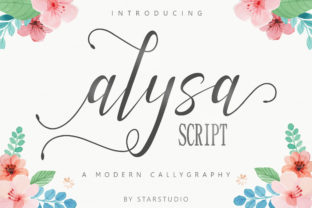
The Alysa Script is an elegant script font that brings a hand-lettered authenticity to digital and print designs. With its flirtatious baseline and flowing curves, it's perfect for projects that require a personal, artistic touch. Whether you're working on branding, logos, greeting cards, or wedding stationery, Alysa Script can elevate your design with a sense of warmth and character.
Understanding the Role of Alysa Script in Design Projects
In any design workflow, typography plays a crucial role in conveying tone and style. Alysa Script fits seamlessly into creative processes where a handwritten feel is desired. It’s especially useful when aiming to evoke emotion, intimacy, or nostalgia—qualities that are hard to achieve with standard sans-serif or serif fonts.
Before starting a project, consider how Alysa Script might complement your overall design language. For instance, if you're designing a logo for a boutique or a lifestyle brand, Alysa Script could serve as the primary typeface for headlines or taglines. Its elegance makes it ideal for creating visual hierarchy without sacrificing readability.
Integration with Other Design Elements
Alysa Script works well with other design assets such as illustrations, photographs, and geometric shapes. When used alongside minimalist backgrounds or clean layouts, it adds contrast and depth. Pairing it with a sans-serif font for body text ensures a balanced composition, making it easier for readers to navigate through content.
Designers often use tools like Adobe Illustrator or Photoshop to apply Alysa Script effectively. These platforms allow for precise control over spacing, kerning, and alignment, which are essential for maintaining consistency across different media types.
Practical Use Cases for Alysa Script
Let’s explore some common scenarios where Alysa Script shines:
- Branding and Logos: Alysa Script can be used for names, slogans, or signature lines. It adds a unique flair that helps differentiate a brand from competitors.
- Greeting Cards and Invitations: The font's soft, cursive appearance is perfect for heartfelt messages, making it a popular choice for birthdays, weddings, and thank-you notes.
- Wedding Stationery: From save-the-date cards to menus and programs, Alysa Script contributes to a romantic and personalized atmosphere.
- Quotes and Inspirational Content: Whether displayed on social media posts or printed as wall art, Alysa Script enhances the visual appeal of quotes and affirmations.
- Business Materials: Brochures, flyers, and packaging can benefit from Alysa Script by adding a touch of sophistication and approachability.
Each of these use cases benefits from thoughtful implementation. It’s important to maintain legibility while ensuring the font complements the message being conveyed. Avoid using it in large blocks of text; instead, reserve it for headings, accents, or decorative elements.
Workflow Integration Tips
To integrate Alysa Script smoothly into your workflow, consider the following:
- Plan Ahead: Determine where Alysa Script will be used before beginning the design process. This helps prevent last-minute changes that may disrupt the layout.
- Test Readability: Ensure that the font remains readable in various sizes and formats. Test it on screens, prints, and mobile devices to confirm compatibility.
- Use with Purpose: Apply Alysa Script only where it enhances the design rather than distracts from it. Think about the emotional impact you want to create.
- Pair Wisely: Combine Alysa Script with complementary fonts to create a cohesive look. A contrasting sans-serif or serif font can help balance the design.
- Stay Consistent: Maintain consistent styling throughout the project. Use the same weights, colors, and spacing to ensure professionalism and clarity.
By incorporating these tips into your workflow, you can maximize the effectiveness of Alysa Script and ensure that it supports the overall goals of your design project.
Long-Term Use and Quality Control
For designers who plan to use Alysa Script regularly, establishing a set of guidelines can improve efficiency and maintain quality. Consider developing a style guide that outlines how and when to use the font, along with examples of successful implementations.
Additionally, keep an eye on updates or new versions of the font that may offer improved features or expanded character sets. Staying informed about font developments ensures that your work remains current and professional.
When collaborating with others, share your preferences regarding font usage to ensure consistency across all materials. Clear communication helps avoid confusion and maintains a unified brand identity.
Organizing Your Font Library
As part of your design workflow, organize your font library to make it easy to access and use Alysa Script whenever needed. Categorize fonts based on their style, purpose, and compatibility with different platforms. Tools like Adobe Fonts or Google Fonts provide convenient access to a wide range of fonts, including Alysa Script.
Maintaining an organized library also helps reduce the risk of errors caused by using the wrong font or version. Regularly review and update your collection to reflect the latest additions and improvements.
By treating font management as an integral part of your workflow, you can streamline your design process and focus more on creativity and execution.
Conclusion
Alysa Script is more than just a font—it’s a versatile tool that can enhance the aesthetic and emotional impact of your designs. By understanding its role in different workflows and implementing it thoughtfully, you can create visually appealing and meaningful projects that resonate with your audience.
Whether you're a professional designer or a hobbyist, integrating Alysa Script into your creative process can add a unique touch that sets your work apart. With careful planning, testing, and organization, you can ensure that it becomes a valuable asset in your design toolkit.